Compare
Goldie alternative for solo stylists and small teams
Compare Goldie and DaySync for a growing solo practice. Goldie’s free plan allows 20 appointments per month. DaySync has no monthly appointment cap, but its free public booking page displays up to 5 services. Compare reminders and payments as well as price: Goldie’s paid plans send SMS reminders, and DaySync sends reminders by email and WhatsApp.
Free for up to 2 people, including the owner. Pro is $12/month for up to 5 people; Business is $25/month with no limit.
Prices checked Oct 8, 2026 on Goldie’s pricing page. Part of our salon software comparison.
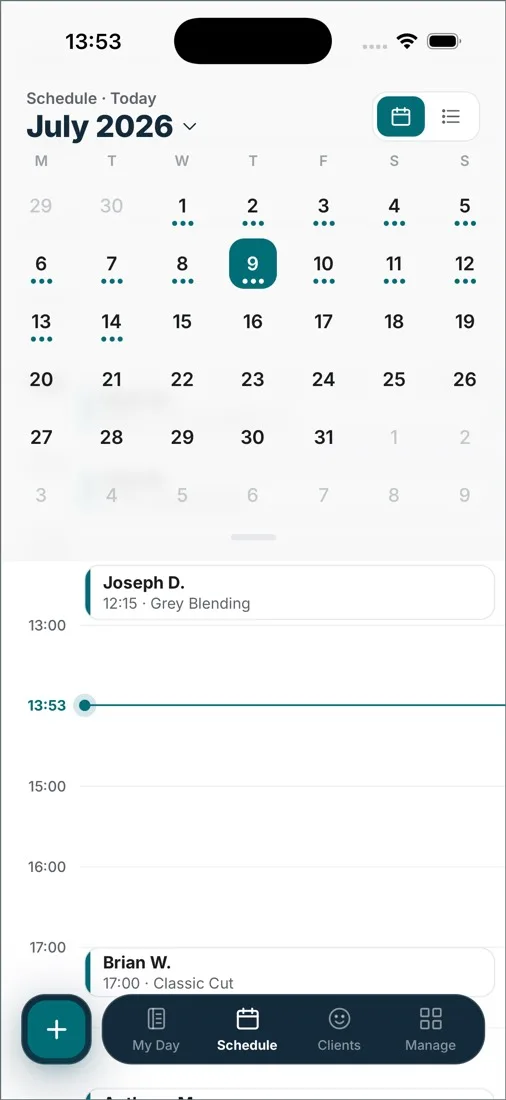
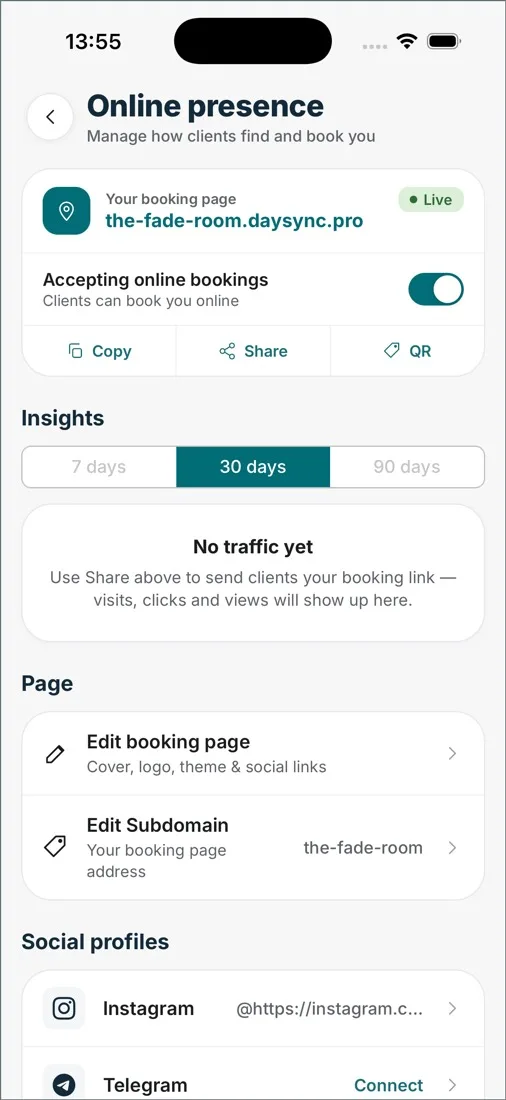
Which one fits your business?
Switch to DaySync if
you're outgrowing the free plan's 20 appointments a month and email reminders work for your clients. DaySync Free has no booking cap for up to 2 people and shows up to 5 services on your booking page; Pro is $12/month for up to 5 people.
Stay on Goldie if
you work alone and rely on SMS reminders: Goldie Pro ($19.99/month) includes 500 SMS credits a month. If your clients only answer texts, that’s worth paying for; DaySync sends no SMS; its reminders go out by email and WhatsApp.
What a month costs, by team size.
US prices in US dollars; other countries may differ. Software subscriptions only; people limits on DaySync include the owner.
| Team | GoldieGoldie’s pricing page · checked Oct 8, 2026 | DaySync |
|---|---|---|
| 1 person | Free (20 appointments/mo) · Pro $19.99/mo | $0, Free |
| 3 people | $39.99/mo (Pro Plus) | $12/month, Pro |
| 5 people | $39.99/mo (Pro Plus) | $12/month, Pro |
| How it’s priced | Free (20 appointments/mo, one user) · Pro $19.99/mo (one user, unlimited) · Pro Plus $39.99/mo (teams) | Per business, not per person: Free for up to 2 people, Pro $12/month for up to 5, Business $25/month with no limit |
A lower price doesn’t mean the same features: compare what each plan includes in the next table. With 6 or more people, DaySync Business is $25/month with no limit. Yearly plans are 2 months free. Payment processing fees are separate on every platform; DaySync takes no cut of client payments.
DaySync and Goldie compared
| GoldieGoldie’s pricing page · checked Oct 8, 2026 | DaySync | |
|---|---|---|
| Online booking | Yes — via the Goldie booking page and app | Yes, from your own link; clients need no app or account |
| Team size | Starter and Pro: one user. Pro Plus: unlimited team members, no per-person fee | Free up to 2 · Pro up to 5 · Business unlimited (the owner counts) |
| Sales and commission | Built-in payments on every plan; product sales and financial reports from Pro; inventory and expense tracking on Pro Plus | Sales records and reports on every plan; payroll and commission calculations on Business |
| Client notifications | Manual reminders on the free plan; automated SMS reminders from Pro with 500 free credits a month (750 on Pro Plus), then paid | Email confirmations and reminders on every plan, WhatsApp with credits; no SMS |
| Card payments | Check payment options in your country | In-person payments stay on your terminal; online booking deposits are coming soon |
| Marketplace | No marketplace — same as DaySync | No marketplace: clients book through a link you share |
| Platforms | Web, iOS, Android | Web, iOS and Android, one account |
US prices in US dollars; other countries may differ. Where Goldie is stronger today, the table says so. DaySync is not affiliated with, endorsed by or sponsored by Goldie. Product names and trademarks belong to their owners.
Features to check before switching
- SMS credits. Goldie’s paid plans include 500–750 SMS credits a month. DaySync sends reminders by email and WhatsApp and sends no SMS; if your clients only answer SMS texts, that’s a real difference.
- Built-in card payments. DaySync records how each visit was paid and adds up the day, but in-person card payments stay on your own terminal. Online booking deposits are coming soon.
Moving from Goldie.
- Check the export options in Goldie. Save the client details and upcoming appointments you need, and see which notes, photos and histories come with them.
- Set up your services and working hours in DaySync. Test a booking on the Free plan; Pro and Business start with 14 days free if you need more people.
- Transfer or block out existing appointments in DaySync before sharing your new link. Check dates, times, services and team members, then disable new bookings in Goldie or keep availability synchronized by hand during the changeover. Once that’s done, put your new booking link in your Instagram bio and Google profile.
- Keep access to the old system until you’ve checked future appointments, client records and any payment arrangements. Email support@daysync.io to talk through what can be moved.
Before you switch.
- What are the limits of Goldie's free plan?
- It covers one user and 20 appointments a month, and reminders are sent manually from your own phone. Unlimited appointments and automated reminders start at Pro ($19.99/month, one user); teams need Pro Plus ($39.99/month).
- How do DaySync and Goldie plans compare?
- They include different things. For one person, Goldie Pro is $19.99/month with automated SMS reminders (500 credits a month); DaySync Free costs nothing, has no booking cap, shows up to 5 services on your booking page and sends reminders by email, with WhatsApp through credit packs bought in the app, but it sends no SMS. For two or more people, Goldie needs Pro Plus at $39.99/month; DaySync Free covers 2 people and Pro is $12/month for up to 5. Choose by the reminders your clients need, not only by price.
- What do I give up by leaving Goldie?
- SMS reminders: Goldie's paid plans include 500–750 SMS credits a month, and DaySync sends no SMS — its reminders go out by email and WhatsApp. Goldie's built-in card payments also stay behind; DaySync doesn't process in-person card payments.
- Can I move my Goldie clients to DaySync?
- Export your client list from Goldie so you own a copy, and check which fields it includes. Email support@daysync.io to confirm what DaySync can import before you move records.
Also comparing: Fresha · Booksy · all comparisons · salon software pricing
Try DaySync alongside Goldie.
Start on Free and move your clients when you’re ready.
Free for up to 2 people, including the owner. No credit card required for the Free plan.