Salon cancellation policy: 7 message templates
 By the DaySync team. Drafted with Lissa, our AI writing assistant.

Your 2 p.m. client cancels at 1:47. You have already prepared the station, and there is little time to offer the appointment to someone else. Now you need to reply while your next client is waiting.
That is a difficult moment to invent a policy.
A written salon cancellation policy gives you wording to return to. It also gives clients a clear answer to a reasonable question: what should I do if my plans change?
Below are seven original templates for the moments when that answer matters. Replace the bracketed fields with your details and remove any sentence that does not apply to your business.
Decide the rules before choosing the words
Your policy should tell a client how much notice you need, how to contact you, and what happens after a late cancellation or missed appointment. If you collect deposits or charge fees, explain the amount, when it applies, how it is collected, and how any deposit is credited against it.
DaySync does not take booking deposits today, so deposit wording in the templates applies only if you collect one another way. Leave those sentences out if you do not.
Choose a notice window that reflects your services. Think about how much time you need to refill a short haircut compared with a long color appointment. If different services have different terms, show the relevant terms clearly at booking.
These templates are communication starting points. Have any fee, deposit and refund terms checked for your location before using them. A sentence in a message does not, by itself, authorize a card charge.
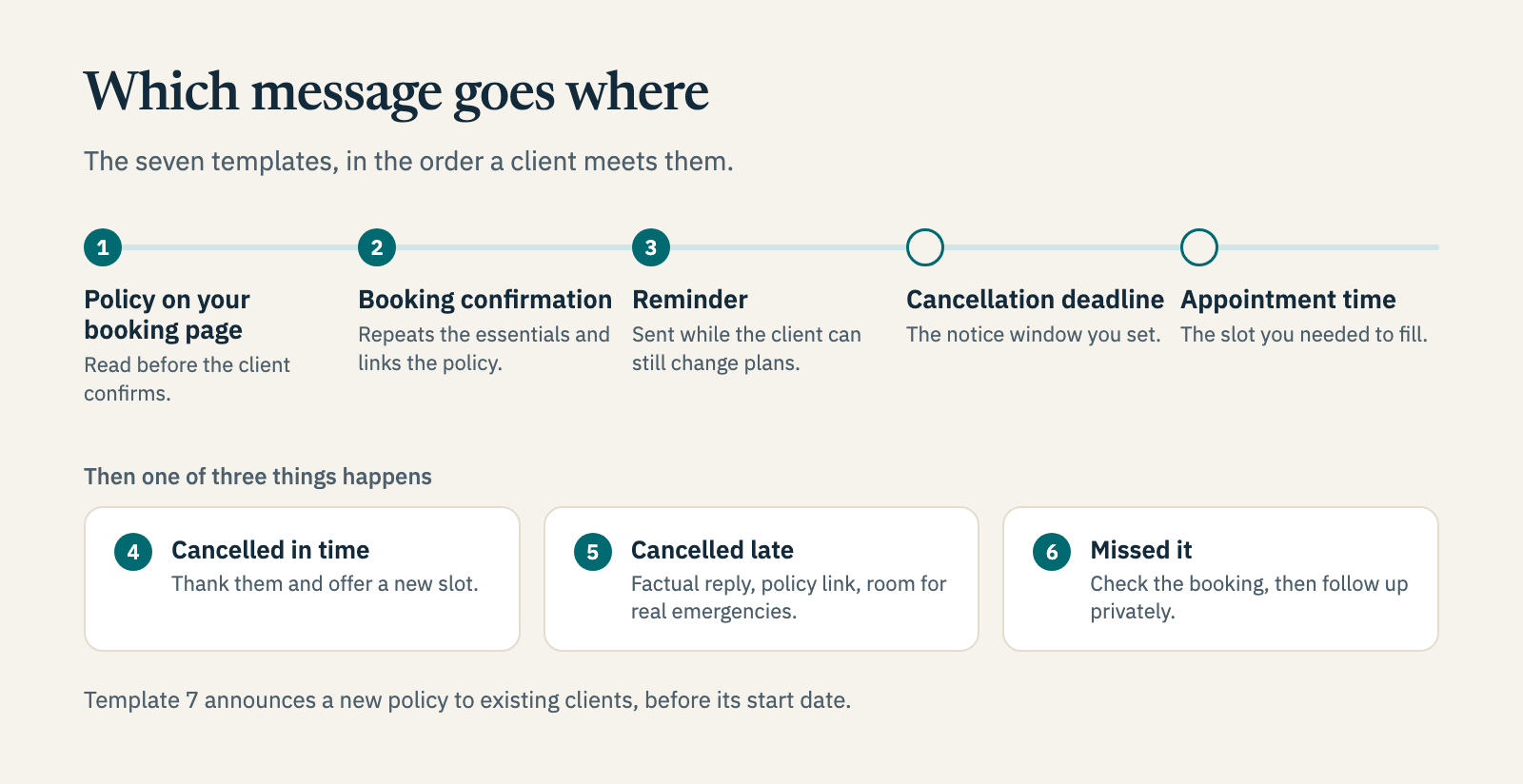
1. The policy for your booking page
Put the full version where clients can read it before confirming an appointment.
Changing or canceling your appointment
Please give us at least [notice period] if you need to cancel or move your appointment. Contact us at [phone/email] so we can offer the time to another client.
Cancellations received with less notice are handled as follows: [late-cancellation terms, including any fee and collection method]. If you miss an appointment without contacting us, [no-show terms].
[If applicable: Your deposit of [amount] goes toward your appointment. For cancellations, rescheduling or missed appointments, [explain the refund, transfer and fee-credit rules].]
If an emergency affects your visit, please contact [person/contact method] so we can discuss your circumstances.
If we need to cancel your appointment, we will contact you promptly to offer [rescheduling and any applicable refund arrangements].
Keep the final version short enough to read comfortably on a phone. Replace vague phrases such as “a charge may apply” with the actual rule your business uses.
2. The booking confirmation
The confirmation should repeat the essentials and point to the full policy.
Hi [Name], you're booked for [service] with [stylist] on [date] at [time]. If you need to change your appointment, please contact [phone/email] by [deadline]. Our cancellation policy is here: [policy link]. We look forward to seeing you. — [Salon]
Use an actual date and time for the deadline where possible. “Tuesday at 3 p.m.” asks less of a client than “48 hours beforehand.”
3. The reminder before the cancellation deadline
Send a reminder while the client still has time to act within your notice window.
Hi [Name], a reminder of your [service] at [Salon] on [date] at [time]. Need a different appointment? Please contact [phone/email] before [deadline]. We'll help you find another time.
A reminder sent after the deadline may still help someone arrive on time, but it gives them no advance opportunity to cancel within the policy.
4. The reply to an on-time cancellation
Make it easy for someone who gave notice to come back.
Thanks for letting us know, [Name]. Your appointment on [date] at [time] is canceled. When you're ready, you can choose another appointment here: [booking link]. We'd be happy to see you again.
If a deposit needs to be refunded or moved, add one sentence explaining what will happen and when.
5. The reply to a late cancellation
Check the booking record and the policy the client received before sending this message.
Hi [Name], I've canceled your appointment for [date/time]. As this falls within our [notice period] cancellation window, [state the applicable outcome and next step]. You can review the policy here: [policy link]. If there are circumstances you'd like us to consider, please contact [person/contact method].
Avoid adding a lecture about respect or how busy you are. A factual message is easier to understand and easier to answer.
6. The no-show follow-up
First check that the appointment details were correct and that the client has not already contacted another team member.
Hi [Name], we missed you at your [time] appointment today. Please contact us at [phone/email] when you can. [Add the applicable next step under your missed-appointment policy.] We can also help you arrange another visit.
Keep the conversation private. A public post about the incident will not help the client resolve it.
7. The announcement of a new policy
Give existing clients a clear start date and explain which bookings the change covers.
From [date], our cancellation policy will apply to [specify which bookings]. We'll ask for [notice period] when you need to cancel or reschedule. You can read the full details here: [policy link]. To change an appointment, contact [phone/email]. Thank you for giving us time to offer available appointments to other clients.
Share this before the change takes effect. Brief your team so a client gets the same explanation whether they call, text or ask at reception.
Give the policy a place in your working day
Keep the current wording somewhere your team can find it. Record cancellations and the decisions made, including any exceptions, so another person can pick up the conversation accurately.
If you want to understand the financial impact first, read how much no-shows can cost a solo nail tech.
For rebooking, a DaySync booking page gives clients somewhere to choose their next appointment. Use the templates above through the communication channels you already manage.
Before your next busy day, save the three messages you use most often. The next time an appointment changes, you will have a clear reply ready—and more time to work on filling the space.